How to use shasum to check hashes of downloaded file on Mac Os

problem

You wish to check the safety of a downloaded file on your Mac. This is feasible if the file provider provides you a checksum file (or a signature file)  that is used to check if the file you have just downloaded is the valid one. 

For example, if a hacker replaced it with a different one (e.g. malicious) on the server then the checksum will not match.

If the checksum didn’t match then it’s not the correct one. The checksum is stored on a different server than the file to be downloaded for security reasons.

SOLUTION

In this example, let’s download Apache Kafka from their website.

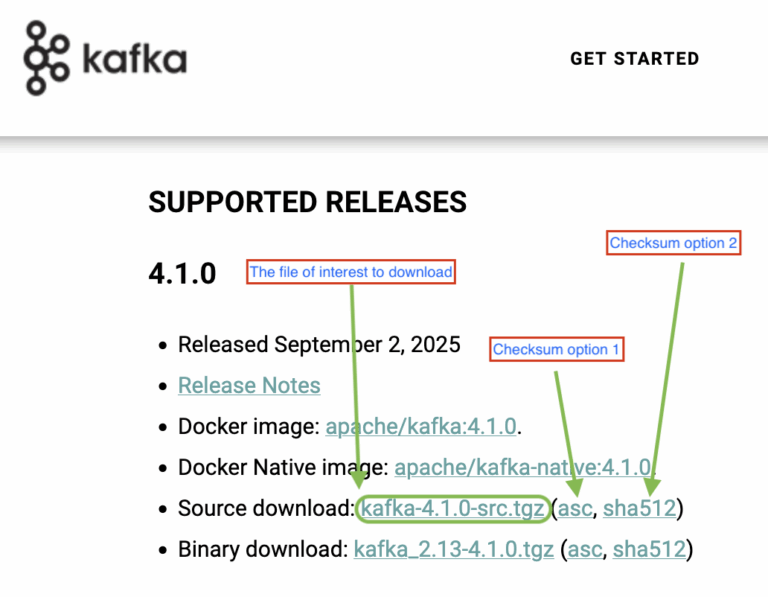
Apache kafka download with checksum file example

As we can see from the screenshot above, the website offers 2 different checksum files for the file we are about to download.

Their difference is the algorithm used for generating them.

  1. asc – a signature file
  2. sha512 – a checksum file


In this example, I will download the sha512 checksum file.

Start verification process

We place the two files in the same directory.

The contents of the sha512 file are as follows:

checksum example

In a text editor, remove the filename and spaces so it looks as follows:

sha512
				
					51797065C03BA2CF3ECE905E02941C0E76AD3091450463B5BA728A323794988922B6BD8320BD7A1DF356B519555A139E9846CEB57BB318F172798FFA086AEBC7


Copy the key and run the following command:

				
					 echo '51797065C03BA2CF3ECE905E02941C0E76AD3091450463B5BA728A323794988922B6BD8320BD7A1DF356B519555A139E9846CEB57BB318F172798FFA086AEBC7  kafka-4.1.0-src.tgz' | shasum -a 512 -c


Let’s break the command down:

  1. First it’s using echo ‘key filename’
  2. Then it’s piping it into the shasum command

Otherwise, it will give this error:

shasum error becuase of 2 spaces example
output
shasum correct verification output example

It matches!

conclusion

In this post, we saw how to verify the identity of a downloaded file by checking its checksum file as recommended by the Apache Kafka website.

Another one similar way to perform such verification is by checking its signature. Both ways conclude the same thing so it comes down to user preference.


References:

https://www.apache.org/info/verification.html

https://en.wikipedia.org/wiki/Checksum 

https://pg-p.ctme.caltech.edu/blog/cybersecurity/what-is-checksum 

https://www.ninjaone.com/blog/what-is-a-checksum/ 

Share it!

Facebook
Twitter
LinkedIn
Reddit
Picture of Ellion

Ellion

Professional IT consultant, writer, programmer enthusiast interested in all sorts of coding.
Eats all cookies 🍪