Pattern matching in switch statement in Java 17+

problem

You are learning the new features introduced to Java version 17 and above. In this post we will see how to use pattern matching in a switch statement. Pattern matching existed in other languages like Scala, Haskel. Java adopted this feature as well.

SOLUTION

Let’s say we have an Object and wish to perform different actions according to its data type.

PatternMatching.java
				
					Object test = true;

switch (test) {
    case null -> System.out.println("It's null");
    case Integer i -> System.out.println("It's Integer");
    case String s -> System.out.println("It's a String");
    case Character c -> System.out.println("It's a character");
    case Boolean b -> System.out.println("It's a boolean");
    default -> System.out.println("It's default");
}


The syntax of switch statement accepts a parameter that in this case is the test object that we want to perform checks on it. 

Because we have few checks to perform, a pattern matching comes very handy in contrast with an if – else statement.

Let’s put it in a main method to run it.

PatternMatching.java
				
					public class PatternMatching {
	
	public static void main(String ...args) {
		System.out.println("Pattern Matching program\n");

		Object test = true;

		switch (test) {
			case null -> System.out.println("It's null");
			case Integer i -> System.out.println("It's Integer");
			case String s -> System.out.println("It's a String");
			case Character c -> System.out.println("It's a character");
			case Boolean b -> System.out.println("It's a boolean");
			default -> System.out.println("It's default");
		}
		System.out.println();
	}
}
				
			
running

In the terminal:

PatternMatching.java
				
					javac PatternMatching.java && java PatternMatching
				
			
output
Pattern matching in java example boolean

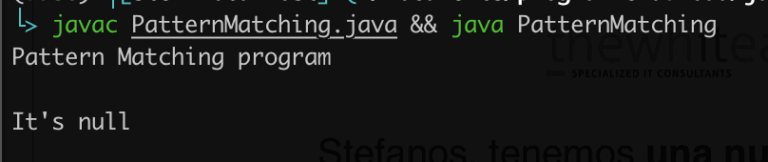
Let’s change the value of test variable to null.

PatternMatching.java
				
					public class PatternMatching {
	
	public static void main(String ...args) {
		System.out.println("Pattern Matching program\n");

        Object test = null;

		switch (test) {
			case null -> System.out.println("It's null");
			case Integer i -> System.out.println("It's Integer");
			case String s -> System.out.println("It's a String");
			case Character c -> System.out.println("It's a character");
			case Boolean b -> System.out.println("It's a boolean");
			default -> System.out.println("It's default");
		}
		System.out.println();
	}
}
				
			
output
Pattern matching in java example null

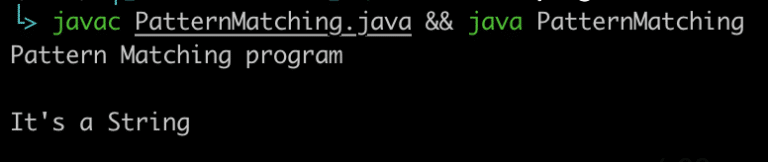
Let’s change the test variable now to a string.

PatternMatching.java
				
					public class PatternMatching {
	
	public static void main(String ...args) {
		System.out.println("Pattern Matching program\n");

        Object test = "pattern matching is cool";

		switch (test) {
			case null -> System.out.println("It's null");
			case Integer i -> System.out.println("It's Integer");
			case String s -> System.out.println("It's a String");
			case Character c -> System.out.println("It's a character");
			case Boolean b -> System.out.println("It's a boolean");
			default -> System.out.println("It's default");
		}
		System.out.println();
	}
}
				
			
output
Pattern matching in java example string

And so on.

conclusion

In this post we saw a basic example of how to use pattern matching in a switch statement in Java version 17 and later.

Share it!

Facebook
Twitter
LinkedIn
Reddit
Picture of Ellion

Ellion

Professional IT consultant, writer, programmer enthusiast interested in all sorts of coding.
Eats all cookies 🍪