Using RestTemplate in Spring boot

Home / java / Using RestTemplate in Spring boot
Published on September 5, 2025
Updated on August 11, 2026
3 min read

problem

You wish to quickly send an Http Request, for example to an API and get back its response. In this post we’re gonna use the https://www.themealdb.com/ API for testing purposes and because I like it.

SOLUTION

Using the RestTemplate object.

In Spring boot, we can autowire the RestTemplate and perform http requests by using an endpoint. 

First, let’s create a @Bean configuration for the RestTemplate as follows:

				
					@Bean
public RestTemplate restTemplate(RestTemplateBuilder builder) {
    return builder.build();
}


I placed that in the main class that runs the Spring Boot application, for example:

ResttemplateApplication.java
				
					package com.programmerabroad.resttemplate;

import org.springframework.boot.SpringApplication;
import org.springframework.boot.autoconfigure.SpringBootApplication;
import org.springframework.boot.web.client.RestTemplateBuilder;
import org.springframework.context.annotation.Bean;
import org.springframework.web.client.RestTemplate;

@SpringBootApplication
public class ResttemplateApplication {

    public static void main(String[] args) {
        SpringApplication.run(ResttemplateApplication.class, args);
    }

    @Bean
    public RestTemplate restTemplate(RestTemplateBuilder builder) {
        return builder.build();
    }
}


Setting the Api url in the application properties and later loading it using the @Value annotation.

application.properties
				
					spring.application.name=resttemplate
themealdb.url=https://www.themealdb.com/api/json/v1/1/search.php?s=


I’m using the RestTemplate to send the HttpRequest to the API:

ResttemplateApplication.java
				
					String url = this.apiUrl + search;
ResponseEntity<String> forEntity = restTemplate.getForEntity(url, String.class);
return forEntity.getBody();


Simply the getForEntity() method is doing all the job in one line.

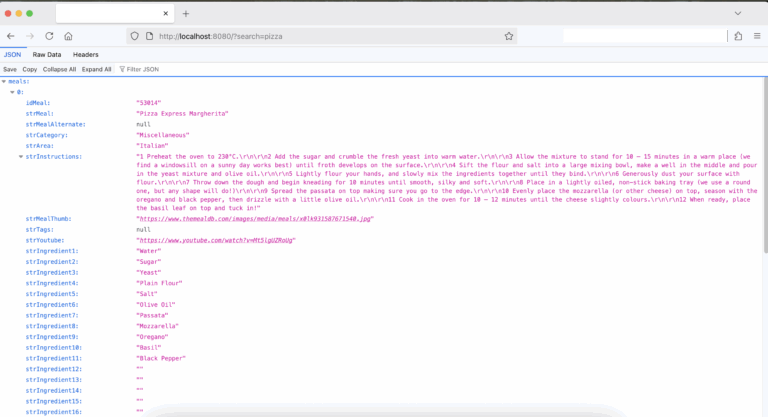
Then I get the response which is a JSON object. The full code as follows:

ResttemplateApplication.java
				
					package com.programmerabroad.resttemplate;

import org.springframework.beans.factory.annotation.Autowired;
import org.springframework.beans.factory.annotation.Value;
import org.springframework.http.HttpStatus;
import org.springframework.http.MediaType;
import org.springframework.http.ResponseEntity;
import org.springframework.web.bind.annotation.*;
import org.springframework.web.client.RestTemplate;

@RestController
public class ApiController {

    @Autowired
    private RestTemplate restTemplate;

    @Value("${themealdb.url}")
    private String apiUrl;

    @GetMapping(value = "/", produces = MediaType.APPLICATION_JSON_VALUE)
    public String index(@RequestParam(name = "search") String search) {

        String url = this.apiUrl + search;

        ResponseEntity<String> forEntity = restTemplate.getForEntity(url, String.class);

        return forEntity.getBody();
    }
}


output
resttemplate - json pretty response from the API
Mapping the JSON response to an object - DTO

We can create a DTO – Data Transfer Object that will be responsible for representing the JSON from the API into an object in the Java world. It’s simply a class that contains all the fields according to the keys in the JSON.

For example:

MealDto.java
				
					package com.programmerabroad.resttemplate;

import java.io.Serializable;

public class MealDto implements Serializable {
    public String idMeal;
    public String strMeal;
    public Object strMealAlternate;
    public String strCategory;
    public String strArea;
    public String strInstructions;
    public String strMealThumb;
    public String strTags;
    public String strYoutube;
    public String strIngredient1;
    public String strIngredient2;
    public String strIngredient3;
    public String strIngredient4;
    public String strIngredient5;
    public String strIngredient6;
    public String strIngredient7;
    public String strIngredient8;
    public String strIngredient9;
    public String strIngredient10;
    public String strIngredient11;
    public String strIngredient12;
    public String strIngredient13;
    public String strIngredient14;
    public String strIngredient15;
    public String strIngredient16;
    public String strIngredient17;
    public String strIngredient18;
    public String strIngredient19;
    public String strIngredient20;
    public String strMeasure1;
    public String strMeasure2;
    public String strMeasure3;
    public String strMeasure4;
    public String strMeasure5;
    public String strMeasure6;
    public String strMeasure7;
    public String strMeasure8;
    public String strMeasure9;
    public String strMeasure10;
    public String strMeasure11;
    public String strMeasure12;
    public String strMeasure13;
    public String strMeasure14;
    public String strMeasure15;
    public String strMeasure16;
    public String strMeasure17;
    public String strMeasure18;
    public String strMeasure19;
    public String strMeasure20;
    public String strSource;
    public Object strImageSource;
    public Object strCreativeCommonsConfirmed;
    public Object dateModified;
}


Because our search result in the API can return more than one results (meals) we need another one DTO class to hold a list of the meals.

For example:

RootDto.java
				
					package com.programmerabroad.resttemplate;

import java.io.Serializable;
import java.util.ArrayList;

public class RootDto implements Serializable {
    public ArrayList<MealDto> meals;
}


Change the controller to adopt the change:

ApiController.java
				
					  @GetMapping(value = "/", produces = MediaType.APPLICATION_JSON_VALUE)
    public ResponseEntity<RootDto> index(@RequestParam(name = "search") String search) {

        String url = this.apiUrl + search;

        ResponseEntity<RootDto> forEntity = restTemplate.getForEntity(url, RootDto.class);

        return forEntity;
    }


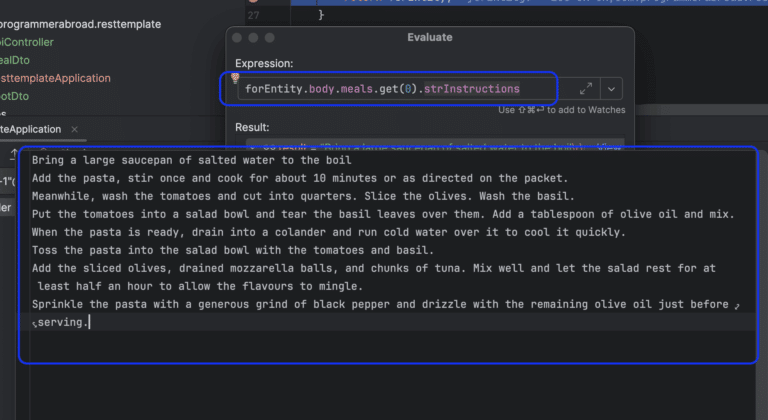
For example, we can retrieve only the instructions of making a meal, e.g. pasta.

				
					forEntity.body.meals.get(0).strInstructions


Simply by accessing the field strInstructions above we can see the instructions as String. 

output
get information by field - resttemplate example mapped to a dto object

conclusion

In this post we saw how to use the RestTemplate object given by Spring Boot and how to hit the API of themealdb.com and get a JSON response to our web browser. Also, we saw how to easily map the JSON response to a Java object POJO/ DTO for more organized information.

Share it!

Facebook
Twitter
LinkedIn
Reddit
Picture of Ellion

Ellion

Professional IT consultant, writer, programmer enthusiast interested in all sorts of coding.
Eats all cookies 🍪